Enabling users to sign in using their Microsoft Entra ID credentials
Traditionally, all users signed into Asta Siteprogress using an Asta Siteprogress user name and password. Setting this up involves specifying an email address and password for each user in Asta Siteprogress configuration. Users then enter the user name and password to sign into Asta Siteprogress.
If your organisation uses Microsoft Entra ID to enable users to sign into their Microsoft accounts at your organisation, you can now choose to have your users sign into Asta Siteprogress using federated authentication, which allows them to sign in using their Microsoft Entra ID credentials. There are three main advantages of this:
- If a user leaves your organisation, you no longer need to remember to edit their user record in Asta Siteprogress configuration and change their user name and password to prevent them from accessing Asta Siteprogress; as soon as their Microsoft Entra ID account is disabled, they are automatically denied access to Asta Siteprogress.
- If your organisation mandates the use of multi-factor authentication, you can implement this using Microsoft Entra ID and it will apply automatically to Asta Siteprogress.
- Eleco will be implementing federated authentication across their range of software products, to enable users to sign into a range of Eleco apps using the same credentials.
If you enable users to sign in using federated authentication, you no longer specify a password for each user in Asta Siteprogress; instead, you specify details of the email address that they use to sign into Microsoft Entra ID.
Enabling federated authentication
To switch to using federated authentication as a sign in method, you need to do the following:
- A Microsoft Entra Admin user needs to set up permissions in the Microsoft Entra Admin Center to enable the Elecosoft Identity Service to federate against your own tenant.
If you already use federated authentication to enable users to sign into other Eleco products, this step is not necessary, as it will already have been done. - Enable federated authentication in Asta Siteprogress configuration and specify the domain names that are used in your users' Microsoft Entra ID credentials.
- Create users in Asta Siteprogress configuration, each one with an email address that uses one of the specified domains.
Each step is described below.
 Setting up permissions in the Microsoft Entra Admin Center
To set up permissions in the Microsoft Entra Admin Center to enable the Elecosoft Identity Service to federate against your own tenant:
- Sign into the Microsoft Entra Admin Center.
- In the Microsoft Entra Admin Center, check the Users can register applications tenant-wide setting (under Identity - Users - User settings):
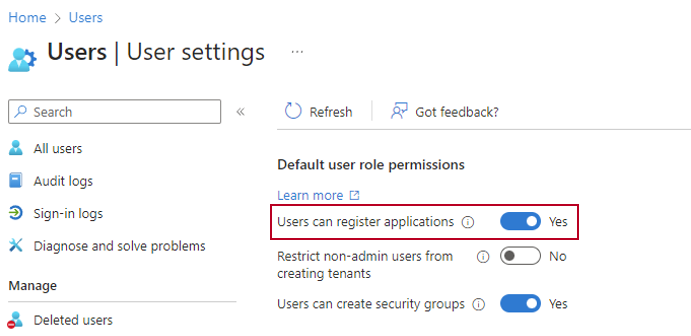
If you set this to 'Yes', you can start using federated authentication immediately, and users will be able to sign into Asta Siteprogress using their Microsoft Entra ID credentials from now on, provided that federation is enabled, the appropriate domains have been specified and the correct email address is specified against each user record in Asta Siteprogress configuration (see below).
If you choose not to set this tenant-wide setting to 'Yes', you must follow the steps below to enable users to sign into Asta Siteprogress using their Microsoft Entra ID credentials:
- Attempt to sign into Asta Siteprogress configuration using your Microsoft Entra ID credentials: on the Elecosoft Identity Service dialog, click Sign in with your Microsoft Entra ID account. The Sign in to your account dialog appears.
- Follow the steps that appear on the screen to sign in using your Microsoft Entra ID credentials. When prompted, click Accept to grant the Elecosoft Identity Service permission to view your basic profile and maintain access to data.
The Elecosoft Identity Service will now appear under Identity - Applications - Enterprise applications in the Microsoft Entra Admin Center. - Sign into the Microsoft Entra Admin Center.
- In the Microsoft Entra Admin Center, find the Elecosoft Identity Service under Identity - Applications - Enterprise applications; you can search for it by entering 'elecosoft' in the search field at the top of the page.
- Once you have found the Elecosoft Identity Service, click it to access its settings.
- In the left-hand menu, click Permissions.
- Click Grant admin consent for <your tenant name>. A popup that allows you to grant organisation-wide consent appears.
- Select your Admin account and accept the permissions requested by the app. From now on, no users will be prompted to consent to the permissions when they sign into Asta Siteprogress using their Microsoft Entra ID credentials.
Enabling federated authentication in Asta Siteprogress configuration
To enable federated authentication in Asta Siteprogress configuration and specify the domain names that are used in your users' Microsoft Entra ID credentials:
- Launch Asta Powerproject and click the Site Progress tab of the Backstage view.
- Click Log in and sign into Asta Siteprogress configuration using the window that appears.
- Click Settings. The Site Progress Settings dialog appears.
- Click the Federation tab.
- Select the Enable federation check box.
- Click Add to add a new row to the Domain Names list.
- Click in the new row and enter a domain that is used in your users' Microsoft Entra ID credentials, for example 'mycompany.com'. The domain name must include at least one full-stop.
- Repeat the above two steps to enter any additional domains. You must include all the domains in this list that are used in your users' credentials. This may be a single domain, for example 'mycompany.com'; or multiple domains, for example 'mycompany.com', 'mycompany.co.uk' and 'alternativecompanyname.com'.
- Click OK to save your changes and return to the Site Progress tab of the Backstage view.
Creating users in Asta Siteprogress configuration
If you have not yet created any Asta Siteprogress users, you can now create them. You must ensure that the email address of each user belongs to one of the domains you have specified on the Federation tab of the Site Progress Settings dialog. With federation enabled, you do not need to specify a password for each user.
If a series of users has already been created and you are enabling federation subsequently, rather than creating new users, you can edit your existing ones after you have enabled federation. Edit each user and ensure that their email address belongs to one of the domains you have specified on the Federation tab of the Site Progress Settings dialog. With federation enabled, you do not need to specify a password for each user. If a password already exists for a user, you do not need to delete it; the password is simply ignored once federation is enabled.
Information on creating and editing users in Asta Siteprogress configuration